
Orbit Downloader

Video DownloadHelper
It's a Recomended way to download youtube movie. it is a firefox extension.
NOT required to finish watching the video to download it.
 Just start the video = and then pick to save it. You can then go to another video and the first will still be completely saved
The easy way to download and convert Web videos from hundreds of YouTube-like sites. This works also for audio and picture galleries.
if you go to a YouTube page, you'll be able to download the video directly on your file system. It also works with MySpace, Google videos, DailyMotion, Porkolt, iFilm, DreamHost and others.

Since version 3.1, you can setup the extension to automatically convert the downloaded movies to your preferred video format.
When you are on a page containing links to images or movies, you can download some or all of them at once. Moving the mouse over the items in the menu will highlights the links directly in the page to make sure they are the ones you want to pick up.
Better YouTube
Watch YouTube videos more efficiently with Better YouTube, a brand new Firefox extension that compiles our favorite YouTube Greasemonkey scripts into a single convenient package.

Usage: Once Better YouTube is installed, go to any YouTube video page to see the enhancements. To turn a feature on or off, visit the extension's Options dialog and select or deselect the appropriate checkboxes, as shown. Refresh YouTube to see your changes.
Flash Video Resources
Flash Video Resources is a site dedicated to bringing you the most updated tools in flash video retrieval.

Like the VideoDownloader extension, but up to date on changing sites & supporting new sites constantly. Sick of using the VideoDownloader extension that is outdated, doesn't work with half the sites it used to & doesn't work with ANY of the new sites? This extension keeps up to date on video sites when they make updates to stop from being downloaded and is constantly adding new sites. It just adds a small icon to the status bar of your Firefox browser. Just click it to download the video you are watching!
Ook? Video Ook!
Ook? Video Ook! enables you to download embedded videos from several systems (such as YouTube, Google Video, Pornotube, Metacafe and many more).
* just one click downloading (just set a target folder on the options dialog once and then click on the status icon or the button where active).
* DownThemAll! integration for better download experience
* file renaming after video title (if you want so)
* files can be stored in a specific folder
* customizable toolbar button
* hideable status icon indicates which specific pages are supported: you can also check the About dialog to get a general idea
* send your requests for sites support or other comments directly from the extension (I'm working on the server side right now)
* new support can be added on the fly using the autoupdate feature
Fast Video Download
In one click, Fast Video Download will save embedded video files from following video-hosting servers:
ag.ru, angryalien.com, animeepisodes.net, badjojo.com, break.com, bublare.dk, current.com, dailymotion.com, hi5.com, metacafe.com, vids.myspace.com, mult.ru, putfile.com, Streetfire.net, vidiac.com, video.google.com and YOUTUBE!

If you spend much of your day interacting with Outlook, take advantage of the ability to track and manage all of your RSS content within the application.

I found a plug in for Microsoft Outlook called NewsGator . it's free to download and use. but before installing the same you need to have Microsoft .Net Framework 2.0 installed in your machine.
Get news and information delivered right to your Microsoft Outlook® folders with NewsGator Inbox
- Synchronize your subscriptions with other readers.
- Forward posts to colleagues and friends.
- Read your subscriptions offline.
- Post directly to your weblog.
With NewsGator Inbox, you can get all your news and information delivered right to your Microsoft Outlook® folders. Forget about all those hours spent searching the web for information. Now you can read your news and information whenever you want. You don't even have to be online.
New in NewsGator Inbox 3.0
- Completely updated UI
- Easy subscription adding
- Flag synchronization
- Attention reporting / APML export
- Improved archiving options
Requirements
- Microsoft Windows 2000/XP/Vista
- Microsoft Outlook® 2000 or later
- Microsoft .NET 2.0 or later
Related Post:

yahoo messenger provides plugins to chat in regional languages like bengali, gujarati, hindi, marathi, tamil, telugu, malayali, kannada. there are 2 different plugins. one is Indichat and the other is chitchat. you can enable or use these plugins by clicking on the "Activities" button on the chat window and choosing the right application. see the above image you can get the idea easily.
you can also play pool, chess and many other games with your oppenants online. the thing required is java. all this game is java supported only.
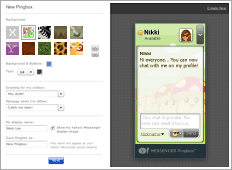 Chat privately with visitors on your social network profiles, blog, or website through Yahoo Pingbox provided by Yahoo! Messenger. you can create your own pingbox and put it into your social network sites like blog, myspace,hi5 etc. you can also customize the pingbox according to your requiements like backgrounds, size, color, personal greeting, and more.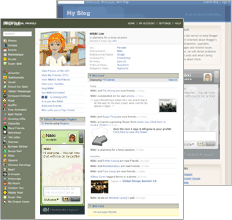
This is true even though lots (and lots!) of visitors can be on the same web page at any moment. The fact remains: Nobody sees a Pingbox conversation except for the single person you’re having a conversation with.
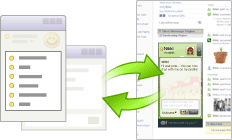
The greatest thing in pingbox is that the visitor need not to have a yahoo messenger id or to be online on yahoo. just you need to be online at the same time.
you can see my ping box in the right hand side, in the last column of my blog. and if i be online you can chat with me also.
 It's now easy and free to setup an internal (intranet) chat server, for your office or at any firm you required. if you have fully qualified domain name running on your server then you can setup it over the internet. for internal use, the fully qualified domain name is not required.
Openfire is free opersource application that provides user friendly administration of your chat server. it's easy to intall and manage. unlike jabber it's installation & confugration is totaly web based. supports all databases for the backend. Openfire is incredibly easy to setup and administer, but offers rock-solid security and performance.
 As it follows the XMPP based protocols, you can use any chat client that uses the same protocol. like jabber, Spark, Pandion, etc. i use Spark as my chat client. it's working realy amazing. got great functionalities. very fancy and attactive looks. one great feature is it's screenshot capturing and sending utitlity. try it and then feel how wonderfull it is.
you can see some openfire screenshots here.
and of spark screenshots here.
both the softwares are available for windows and linux operating system.
 Flashblock is a firefox browser addon to block the flash file while you browsing web pages. i found it when i wanted to reduce the traffic of my home broadband connection and save the usage of data.
Flashblock is an extension for the Mozilla, Firefox, and Netscape browsers that takes a pessimistic approach to dealing with Macromedia Flash content on a webpage and blocks ALL Flash content from loading. It then leaves placeholders on the webpage that allow you to click to download and then view the Flash content.
Flashblock currently blocks the following content types:
* Macromedia Flash
* Macromedia Shockwave
* Macromedia Authorware
Their public support forums can be accessed via:
our mailing list: http://www.mozdev.org/mailman/listinfo/flashblock
or newsgroup: news://news.mozdev.org/public.mozdev.flashblock
Want to upload photos by email?
You can upload photos directly to by sending them to a secret email address. Photos are placed in your Drop Box folder unless you specify an existing album's name as the subject of your email.Uploading photos by email is particularly useful for mobile phones and devices with integrated cameras and email or MMS capabilities.
How to get the secret email address?
the secret email address you can get by going to your picasa web album's settings. find the heading Upload Photos by Email and check the box Allow me to upload photos by email. enter the secret word and it will show you the secret email address to upload the photos by email.
 About name tags:
Naming people in your photos should be easy. You'll be amazed at how quickly you can name everyone in your albums. Use name tags for sorting photos and creating slideshows of your friends and family. See for yourself! You also have the ability to hide name tags from being shown publicly - for all albums (this page), for specific people (People page), or in specific albums (Edit Album Properties).
Google's Picasa web album interface has introduced new tag photo feature. i found it wornderfull, amazing, very intelligent face detection technology used. this new feature very flexible, faster, time saving and easy to do. i have not seen this type of very much efficient feature in any of the other web albums. try it you will definitely enjoy it.
to enable the new feature in your picasa web album find the "New! in picasa web albums" and choose the option for tag photos. once you will enable the feature you can then see the "Add name Tags" button. now open any album and find the "Add name Tags" button and click it.
it will then show you the collection of all the possible faces in your album pics. and will show it in line and ask you one by one to name it. below that it will show you all the pics that the face is being repeated in all. if you found something not related you can uncheck it. and you can also skip or ignore or not a face it. you can link the name to their email id if it is in your contact list.

while tagging the photo if the face is not sharper or clear or darker, then you can also click on the icon below that pic and see it in it's original size and then can decide weather the tag is applicable on that pic or not. (example: see bellow pic)

all faces in all the photos of your album will so their name while mouse over the faces. you can list all the list of members, and by clicking on it you can see all the pics related to that person in all over your albums.


Well, this sucks for Second Life
 . Google is launching a new service today called Lively, a browser based virtual world add-on that lets users create and customize avatars and worlds, interact with other users, and generally have a richer social interaction than is offered by GTalk today.
 Worlds can be embedded into web pages, although only Windows users on IE or Firefox can view them, after an add-on download and installation. Mac and Linux users will have to wait for now.
Google has created a number of sample rooms that can be copied and altered, or users can start from scratch and build their own world. Furniture and other items can be added and moved around. Avatars can talk to each other, do things like dance and shake hands, and manipulate objects (in a demo, my avatar was able to blow up drums of toxic waste by double clicking on them. Users can also, of course, chat with each other - GTalk is the underlying chat engine.

appwiz.cpl -- Used to run Add/Remove wizard
Calc --Calculator
Cfgwiz32 --ISDN Configuration Wizard
Charmap --Character Map
Chkdisk --Repair damaged files
Cleanmgr --Cleans up hard drives
Clipbrd --Windows Clipboard viewer
Control --Displays Control Panel
Cmd --Opens a new Command Window
Control mouse --Used to control mouse properties
Dcomcnfg --DCOM user security
Debug --Assembly language programming tool
Defrag --Defragmentation tool
Drwatson --Records programs crash & snapshots
Dxdiag --DirectX Diagnostic Utility
Explorer --Windows Explorer
Fontview --Graphical font viewer
Fsmgmt.msc -- Used to open shared folders
Firewall.cpl -- Used to configure windows firewall
Ftp -ftp.exe program
Hostname --Returns Computer's name
Hdwwiz.cpl -- Used to run Add Hardware wizard
Ipconfig --Displays IP configuration for all network adapters
Logoff -- Used to logoff the computer
MMC --Microsoft Management Console
Msconfig --Configuration to edit startup files
Mstsc -- Used to access remote desktop
Mrc -- Malicious Software Removal Tool
Msinfo32 --Microsoft System Information Utility
Nbtstat --Displays stats and current connections using NetBIOS over TCP/IP
Netstat --Displays all active network connections
Nslookup--Returns your local DNS server
Osk ---Used to access on screen keyboard
Perfmon.msc -- Used to configure the performance of Monitor.
Ping --Sends data to a specified host/IP
Powercfg.cpl -- Used to configure power option
Regedit --Registry Editor
Regwiz -- Registration wizard
Sfc /scannow -- System File Checker
Sndrec32 --Sound Recorder
Shutdown -- Used to shutdown the windows
Spider -- Used to open spider solitaire card game
Sfc / scannow -- Used to run system file checker utility.
Sndvol32 --Volume control for soundcard
Sysedit -- Edit system startup files
Taskmgr --Task manager
Telephon.cpl -- Used to configure modem options.
Telnet --Telnet program
Tracert --Traces and displays all paths required to reach an internet host
Winchat -- Used to chat with Microsoft
Wmplayer -- Used to run Windows Media player
Wab -- Used to open Windows address Book.
WinWord -- Used to open Microsoft word
Winipcfg --Displays IP configuration
Winver -- Used to check Windows Version
Wupdmgr --Takes you to Microsoft Windows Update
Write -- Used to open WordPad
for example
- now can select and change the theme of your profile using orkut's official profiles.
- tag your friends and relatives faces in their album pictures.
- add various applications in profile.
but the thing is all these features are being enabled country wise. when used a proxy of india and login to my account all these features were enabled in it. and when used the proxy of china. it was not there. so if you can't see and modify them.but i hope it will be enabled for all countries soon. as the orkut is introducing and updating new features using orkut beta.
How to Change theme of your orkut profile?
you can select the new theme by clicking on 'change theme' link shown on the top right side of your homepage. and then can select the theme you like.
there are many other themes disabled, which would be under construction. and if you don't like them you can disable theme also by checking on the check box shown on the top of the theme list.

How to Tag photo in Orkut?
- open your photo album. click on the photo you want to tag on.
- at the below of the image, right side there will be a link "show all" and "add tag".
- click on add tag link.
- move the mouse and drag it on the the face of your friend. it will show the selection square box.
- leave the left click and the dialog box will appear to enter you friends name.
- it should be in your friend list. you can't tag photo of a friend which is not in your friend list.
- also you can tag multiple friends in one photo.

all the tagged photo will be shown in your profile as well as on your friends profile whom you have tagged. that link will be last in the link line starting with "scraps". it will be named as "photos of me".
Related:

example: you choose "HOUSE" as the initial category, and then it will show HOUSE as a big globe and around it there will be small planets named BUILDING, SKY, TREES, BLUE, LIGHT, ARCHITECTURE, HOME, WINDOW...etc. then you select ARCHITECTURE so it will become HOUSE+ARCHITECTURE. and then so on...

when you reach to your final choice of tag. then click on the main central big globe. it will come in front of your screen and then the site will fetch all the photos for the related tag from the flickr and they will start to land and stick on the globe group wise.

you can turn the globe right-left, up-down with your mouse. and can zoom it with your mouse wheel. click on the photo. it will come in front and further click will so it's detail provided by flickr. and it will show the link of the flickr page also, where it is situated.
Related:

it is available with three versions: Standard, Accessible and Spanish.
Standard Version Features
- Supports multiple keyboard layouts and more can be added easily (see the developers section). Includes support for non-rectangular keys. The following keyboard layouts are currently supported:
- Danish
- Finnish
- French
- French-Belgian
- German
- Hebrew (no lesson files)
- Italian
- Norwegian
- Numeric Keypad
- Portuguese
- Spanish
- UK-English
- US-Dvorak
- US-English
- A clear indication of which fingers to use. This is the essence of touchtyping.
- A 3D typing game.
- Typing statistics and the option of practising the least accurate/slowest/custom keys.
- Keyboard is not a fixed size (resolution independent).
- Multi-user support.
- Teacher support (view student statistics).
- Interface for editing lesson files and game settings.
- Backspace support
- Right to left text support.
- Variable text size.
- Lesson files can be prose or poems.
- Lesson progress indicator.
- Completely free with full source code availability.
Multi-user aspects of the Standard Version
The version of TypeFaster Typing Tutor that is installed can be set when the installer is run.
Multi-user This is for several users on one computer. For example, each of your family members can have their own login. The settings and progress of each user is stored.
Multi-user with teacher support This version is designed for use in a school. It must be installed in one place only, for example in a shared, writable network folder. Ideally in its own fairly small partition but with some space for new users. In this version there are two types of users: ordinary users and users with teacher privileges.
When ordinary users (pupils) login, they must select a teacher. The pupil will then get the lesson files that that teacher specified. So there should be a teacher's name for each different set of lesson files. An example of a teacher's login name is:
'Mr Smith'
If Mr Smith teaches typing to two different grades then he should create a different login for each grade, so for example, he could then create two users with teacher privileges:
'Mr Smith's Grade 8s' and
'Mr Smith's Grade 9s'
and give them different lesson files.
About the Accessible Version
The accessible version is for visually impaired or blind users. It uses the excellent, free, text-to-speech engine: Flite, to provide continuous voice support. Currently, only the US-English keyboard layout is supported.
How to create?
Go to Mail options -> Spam -> Set up a disposableor in Yahoo Mail Classic Options -> Mail -> AddressGuard
format: Basename-keyword@yahoo.com
The Basename is the unique ID other different from your Yahoo ID. which should be available for you to use. Basename will be the same in all of your disposable email address which you will create.
keyword will be differ for every new disposable mail address. For instance, if you are creating an address to receive an email newsletter from Widget Designs, your keyword could be "widget" or "widgetdesigns". and then you can set the folder where those mail should be delivered. you can also send mails using this new mail address by checking on "Allow messages to be sent from this address".
when ever you start getting spam through any of your disposable addresses, just delete the address. and can say bye to spam.
How it is more meaning full then using gmail plus sign for filtering spam?
in gmail you have to use your running gmail id and then you concatenate a new keyword with "+" sign. the spammers can split up it easily and can use your running gmail address easily. but in case of yahoo disposable mail address, they can not remove the remaining word after "-" in your mail address. they have to use it full. otherwise you can't receive the mail. so it is much meaning full.Related:
- Gmail: how to use 'plus' sign for filtering mails
- Three Ways to Use Gmail on your Phone
- send secure encrypted email message
- Email zip file without signing in your email account
Well there are many of website that provides free online photo editor tools. And one of them even gives the adobe photoshop like editing facility online.
Adobe Photoshop Express is online photo editor by adobe. But it does not provide the features like layer and all as there in photoshop software. It is just for general purpose like Microsoft picture manager, or some more features. Provides you to save them in your profile and Supports for Facebook, Photobucket, and Picasa albums.
Splashup is the closest you'll get to a true photo editor like Adobe Photoshop. It has the same look and feel as Photoshop and a lot of tools Photoshop users are familiar with, it offers mutli-layer images, filters, etc. The interface is easy enough to navigate and the service is pretty fast. You can easily edit photos from Facebook, Flickr, and Picasa as well as save them to each of the aforementioned services. It allows you to edit many images at once. and even has its own file format so you can save your work in progress.

PicResize is online and available for free photo editor. It has two versions 2.0 & 3.0. the newer version is more over graphical and user flexible to use. Images will not be stored on the server for you. You need to download it and save it on your own machine after editing it. It Allows you to edit jpg, png and gif formats. But in case of gif image it looses it’s animation. To edit gif image there is another online tool GifResizer (described bellow). The PicResize service will always remain free to use.

GifResizer by smileygenerator.us is online gif image editor tool. Where u can resize, edit effects, crop, replace color, etc. with gif image.
The Rest are...
Flauntr

Picnik

FotoFlexer

Phixr

Pixenate

Pixerus

SnipShot

Cellsea

 In friend list of user or in your homepage, only the name link will be visible to you. no images of orkut users in the friend list of any one's profile is visible. no photos in recent updates block on the home page. it will be for example "Cute Piscean ... added 6 new photos".
also in Scrapbook, images of scrappers are avoided. you can only view his/her image by clicking on it. by default be titled as "show photo".
To enable / disable settings to use low bandwidth of orkut. go to
settings->general and choose the appropriate option.

follow this:

- in address bar type "about:config" and press enter. this will bring you the configuration list with different parameters.
- Double click the following settings and put up the numbers as described bellow. for booleans - it will change to true/false with double clicking on it. if you can't find any value just right click anywhere on the screen and add a New variable.
- Change following settings:
network.http.max-connections – 48
network.http.max-connections-per-server – 16
network.http.max-persistent-connections-per-proxy – 8
network.http.max-persistent-connections-per-server – 4
network.http.pipelining – true
network.http.pipelining.maxrequests – 100
network.http.proxy.pipelining – true
network.http.request.timeout – 300
Add new parameter "nglayout.initialpaint.delay" and set it's value to "0". This value is the amount of time the browser waits before it acts on information it receives. Since you’re broadband - it shouldn’t have to wait.
Now enjoy loading of webpages much faster than before.
Related:
What is Screen Capture?
there are many softwares available to capture screen and make a movie clip of it. but listed here are some free and user friendly softwares.
VidShot Capturer is released for free software. is created for quick screen capturing. You can use VidShot Capturer for capturing anything you see on your PC desktop and record them to video. You can capture windows, region, the entire desktop and even cursor moving. More over VidShot Capturer allows to adjust the frames of the video. It has an easy to use interface that’s why you can manage it, even if you'r new to making screen captures.
Features
- Capture Video from desktop
- Capture video from Window
- Capture wideo from region of your desktop
- Automatic Video options
- Frame Rate advaned settings
- Easy and nice interface
CamStudio is open source software, it is able to record all screen and audio activity on your computer and create industry-standard AVI video files and using its built-in SWF Producer can turn those AVIs into lean, mean, bandwidth-friendly Streaming Flash videos (SWFs)
CamStudio also comes with its own Lossless Codec that produces crystal clear results with a much smaller filesize compared with other more popular codecs, like Microsoft Video 1.
You have total control over the output of your video: you can choose to use custom cursors, to record the whole screen or just a section of it and can reduce or increase the quality of the recording depending on if you want smaller videos (for emailing to people, for instance) or you can have "best quality" ones for burning onto CD/DVD.
Free Screen Capture is an all-in-one software for free screen capture. You can capture screen in many ways, including full screen capture, region capture, window capture, scroll capture, directx capture, video screen capture, sound record and etc. You can choose many kinds of output ways, including clipboard, printer, email, editor tool, temp folder, and all popular formats. Super Screen Capture has an easy-to-use and intuitive interface. Whatever you can see on your screen, Super Screen Capture will easily and fastest capture for your immediate use.
Output audio file is mp3, and you can listen extracted audio with your mp3 player without any additional conversion or modification. Video mp3 Extractor provides simple and fast method to rip audio from video and save as MP3.

Features
- Convert Video Files directly to mp3
- No additional software required
- Fast audion extraction algorithm
- Easy to use interface.
Minimum System Requirements
- Windows Vista, Windows XP, Windows 2000, Windows 2003
you can use 'plus'(+) sign for filtering the mails in your gmail account. Like many other Email providers, Gmail supports the standard "plus" addressing scheme. But just what is it, and how can it help me?
The "plus" method of addressing lets you add additional words to your account name (the "left side" of your email address.) For example, if your email address is "amitshahc@gmail.com", you could add "+office" when you give your email address to members of a club to which you belong. So, your email address would now be "amitshahc+office@gmail.com". But why would you want to do this? Think of the "plus" word as an extra "keyword" or "tag" that you can use to better manage your messages.
Using this example, say you email an invitation to your colleagues in a office asking them to rsvp to the invitaion. You ask them to reply to "amitshahc+nope@gmail.com" when sending you a response, if they don't want to come. and reply to "amitshahc+ofcourse@gmail.com". Assuming they follow your directions, You can then set up a Gmail Filters to automatically route emails to specific Labels based on the addresses. It's a simple example, but the uses can be numerous.
Another use is when you are shopping online. When asked for an email address, use something like "amitshahc+amazon@gmail.com". That way, whenever you get future emails addressed to that address, you'll know that it's either from Amazon directly or from someone to whom they sold your email address. This can be a somewhat effctive way to track spam. Just be aware that not all email systems recognize or accept "plus" addresses. In fact, some spammers even strip it out completely, but it's a cool tool, none the less. The best way is to just try it and see if it works for your application!
Related:
Adobe provides the online service to convert any of your pdf document to HTML or TEXT. There are two ways to do it.

- if you have the pdf document on your local drive. you can convert it by sending document Email Attachment to given mail address
- pdf2txt@adobe.com for converting in to plain text format
- pdf2html@adobe.com for converting in to HTML format
- if you have the document on the internet. you can go to the Adobe website and by filling the required information about that document in the given form. you can convert it on your browser. provided that the document must have a accessible url.

Steps:
- go to Start>Run and type "regedit"
- go to -HKEY_LOCAL_MACHINE\ SOFTWARE\ Microsoft\ Windows\ CurrentVersion\ Explorer\ RemoteComputer\ NameSpace\ {D6277990-4C6A-11CF-8D87-00AA0060F5BF}
- Delete the Key named "Printers".
- go to HKEY_CURRENT_USER\ Software\ Microsoft\ Windows\ CurrentVersion\ Internet Settings
- check this two DWORD values
- MaxConnectionsPer1_0Server
- MaxConnectionsPerServer
- change their values to 0000010 and 00000010 respectively.
Related:
 it's not official Google offering like Google Toolbar.
To disable GooglePreview click on
 in the status bar (bottom right corner) ->
  click again to enable.
If you only see gray borders next to the search results, you may have the 'Redirect Remover' extension installed. In this case please add 'googlepreview.com' to white list of 'Redirect Remover'.
Download plug-in: Firefox & IE
Related:
- Save opened tabs in IE-7: Session Manager
- View any Picture Album as 3D WALL
- Save last open tabs in Firefox
- Download all from the webpage